
A team wants to build a new application. They immediately map out 40 microservices, setup massive Kubernetes clusters, and introduce distributed transactions before they even have 100 active users. It is a total mess. You just need a clean system that handles traffic spikes.
If you are trying to clean up a messy codebase, you need the right technical brains in your corner. Hiring senior Azure developers who have actually broken production systems is the quickest way to avoid these structural traps.
Let us talk about what actually works in production right now. Modern applications require high availability, low latency, and predictable costs. Achieving that requires choosing specific structural setups that match your business logic. And as we look at Azure trends in 2026, leaning into simplicity over extreme complexity is the only way to scale without burning cash.
The Event-Driven Asynchronous Pattern
Most business applications spend way too much time waiting for things to happen. A user clicks a button. The system triggers an API call to a third-party vendor. The user stares at a spinning wheel for 8 seconds. That is bad design.
The event-driven pattern splits your processes into publishers and subscribers. Your application fires an event to a broker and immediately returns a success message to the client.
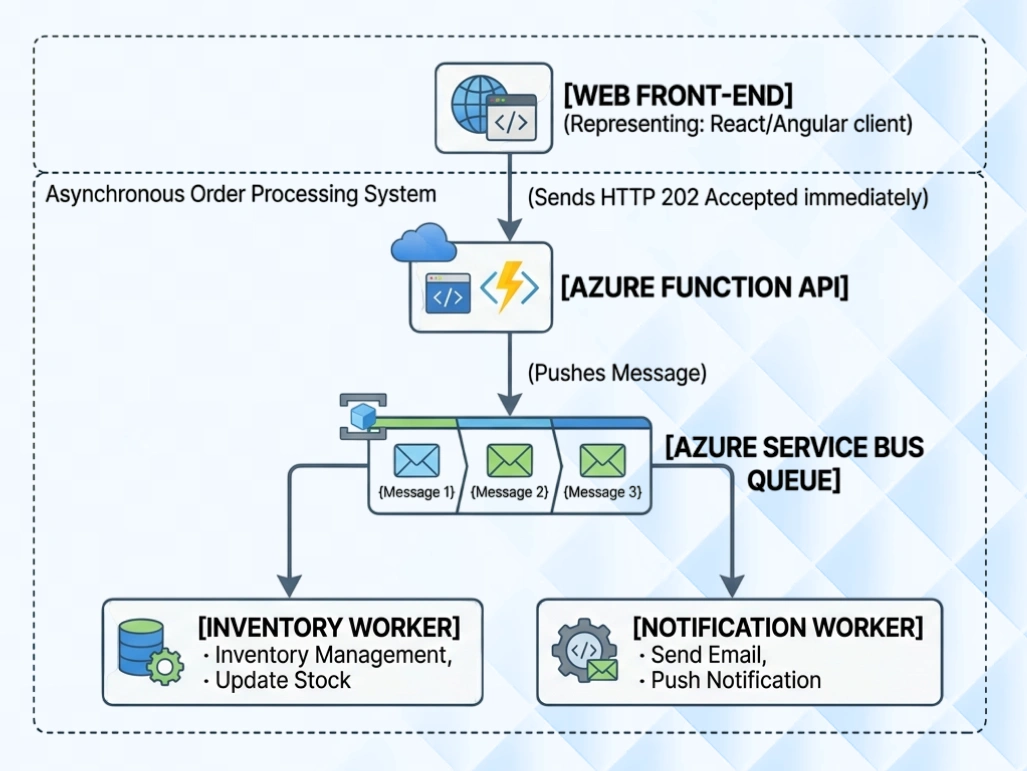
You have two primary choices for message queues in Azure. Storage Queues work fine if you just need a simple, cheap queue. If you need advanced features, use Service Bus. Service Bus gives you sessions, which guarantee exact ordering across complex transactions.
Service Bus gives you dead-letter queues out of the box. Poisoned messages do not crash your workers repeatedly. They get isolated for manual review. You also get publish-subscribe topics. A single event, like OrderPlaced, can be grabbed by your inventory system, your billing engine, and your shipping service simultaneously. Your teams do not write custom code to make these systems talk to each other.

Imagine you run a logistics system. A driver updates their delivery status. If your API tries to write to the database, generate a PDF receipt, send an email, and update an ERP system all in one action, it will fail. SendGrid will time out. The ERP will be down for maintenance.
With an event-driven setup, the driver hits the API. The API drops a message into Azure Service Bus and responds with an HTTP 202 status code. The driver is back on the road. Separate Azure Functions handle the PDF generation and the email delivery in the background.
The CQRS Pattern For High-Read Applications
Command Query Responsibility Segregation sounds academic. It is highly practical. Most applications read data 90% of the time and write data 10% of the time. Yet, we use the exact same database model for both operations.
CQRS splits your application into two distinct paths. Commands perform writes, updates, and deletes. Queries perform reads. Queries just want raw data delivered to the screen as fast as humanly possible.
You can use a standard Azure SQL database for your commands. When an update happens, an event fires and updates a denormalized read-model stored in Azure Cosmos DB or Azure Cache for Redis.
Building a read model means listening to the event stream. Your command database publishes an update. A background worker picks it up. It flattens the relational data into a simple JSON document. It saves that document to Redis. The web front-end queries Redis directly.
When your admin dashboard needs to display a complex report with 15 table joins, it skips the massive SQL query that slows down the checkout page. It queries a single flat document in Cosmos DB. The data is pre-computed.
You must accept eventual consistency if you use this approach. When a user updates their profile picture, it might take 2 seconds for that change to reflect on their public dashboard. For a social app or a business platform, that is completely fine. Do not sacrifice massive performance gains just because your engineering team fears a 2-second data delay.
The API Gateway Pattern For Messy Microservices
Managing client connections is a nightmare with microservices. Your mobile app, web app, and third-party integrations all need to know which internal ports and URLs to hit. If you rename a service or split a database, you break your client applications.
The API Gateway pattern places a single proxy layer in front of your entire ecosystem. Azure API Management acts as this gatekeeper.
Instead of writing authentication code into every single microservice, you configure it once at the gateway level. You can use Azure API Management to inspect incoming tokens and block abusive IP addresses before the traffic ever reaches your internal servers.
You can also handle rate limiting at the edge. A single malicious user spamming your login page can take down your identity service. API Management lets you cap requests to 100 per minute per IP address. The gateway drops the traffic before it touches your internal network. You save compute cycles and bandwidth costs.
This saves your development teams from writing repetitive boilerplate code. They focus entirely on writing business logic while the gateway handles the operational overhead.
Cloud Design Patterns You Actually Use
Forget the theoretical textbooks. Let us look at the patterns that keep your system online when things go wrong. These concepts are especially heavily relied upon in industrial use cases. If you review how Azure for manufacturing handles physical sensor data, you see these exact patterns running on factory floors.
When an external service goes down, your application will naturally keep trying to call it. If you have 500 users hitting an endpoint that waits for a dead payment gateway, those requests will pile up. They will consume your server threads and crash your infrastructure.
You pair the Circuit Breaker with the Retry pattern. Temporary network blips happen constantly in the cloud. The Retry pattern automatically attempts the call again with exponential backoff. It waits 1 second, then 2 seconds, then 4 seconds.
If it still fails, the Circuit Breaker pattern steps in and shuts the connection down completely. The circuit trips and opens. Every single call to that service fails immediately at the local level. Your application does not waste time waiting for timeouts. It returns a cached response or a clean error message to the user.
If your users need to upload large files, do not stream that data through your application servers. It wastes bandwidth and bogs down your memory pools.
Use the Valet Key pattern. The client requests permission to upload a file from your API. Your API validates the user and generates an Azure Storage Shared Access Signature URL. This URL contains a temporary cryptographic token. The client uploads the file directly to Azure Blob Storage using that secure URL.
This is heavily used in media processing. A user uploads a raw 4K video file using the Valet Key directly to Blob Storage. The upload triggers an Event Grid notification. An Azure Media Services worker picks up the file, transcodes it to 1080p, and saves the new file.
Your main web server never touched a single megabyte of video data. Microsoft's global storage infrastructure handled the heavy lifting of receiving a 5-gigabyte file.
Managing State And Data Persistence
Choosing where data lives is the most expensive decision you will make in cloud architecture. If you get this wrong, your cloud bill will skyrocket. Your application will feel sluggish.
Stop using Azure SQL for unstructured log data or rapidly changing telemetry tracking. It gets incredibly expensive to scale relational databases horizontally. Use Azure Cosmos DB for a multi-tenant platform where different companies need completely different custom fields. Cosmos DB handles horizontal scaling automatically through partitioning. You select a smart partition key, like a Tenant ID, to ensure your data is distributed evenly across physical data centers.
Do not query your main database for data that rarely changes. If your app pulls a list of country codes or tenant settings on every page load, you are throwing money away.
Implement the cache-aside pattern using Azure Cache for Redis. You check Redis first. If the data is missing, you query Azure SQL, save a copy in Redis, and return the data. This simple check reduces the load on your primary SQL database by massive margins.

Fixing The Deployment Mess
A beautiful architecture means absolutely nothing if your team deploys updates by manually dragging and dropping compiled files via FTP. That is how production outages happen.
You need to treat your infrastructure exactly like your application code. This is where a dedicated Azure DevOps developer becomes invaluable. They build the pipelines that automate your testing, enforce code quality, and provision your resources cleanly. If you do not want to hire internally, partnering with an agency for full Azure DevOps services achieves the exact same operational maturity.
Containerization is mandatory now. If you are deploying raw binaries directly to virtual machines, you are living in the past. Wrap your code in lightweight containers. Combining Azure + Docker ensures that the exact code running on a developer's laptop is identical to the code running in production. It eliminates the excuse that it worked on someone's local machine.
Once your apps are containerized, use Azure Container Apps or Azure Kubernetes Service. You gain instant horizontal scaling and zero-downtime rolling deployments.
Manual server patching kills productivity. When you use App Service or Container Apps, Microsoft handles the operating system updates. You just care about your application code. That division of labor lets small engineering teams output massive amounts of value. They stop acting as part-time system administrators.
Stop clicking around the Azure Portal to create resources. If a developer manually configures a production database firewall rule at 2:00 AM, that change is completely invisible to the rest of the team. When that database gets recreated next year, the rule will be missing. Everything will break again.
Use infrastructure as code. Write your setups in Azure Bicep or Terraform files. Store those files in Git alongside your source code. When you want to roll out an entirely new staging environment for a client, you run a pipeline. Your entire infrastructure builds itself exactly the same way every time.
Moving Forward With Real-World Execution
Architectural patterns exist to solve distinct, practical business problems. They keep your systems up. They keep your costs down. They ensure your team can ship features without fear.
If you are looking at an upcoming migration or trying to sort through a tangled web of legacy services, you need specialized expertise. Bringing in an experienced Azure migration expert saves you months of trial, error, and wasted cloud spend. They look at your existing workload, spot the bottlenecks, and help you map out a clean path toward these modern patterns.
Building a solid cloud system takes time. Getting the core architecture right on day one saves you from a world of technical debt down the road. Focus on decoupling your components, handling failures gracefully, and automating every single step of your deployment.